
This activity enables to retrieve the outlook account list that are actively available
in the local machine.
Technical Reference
|
|
MISC |
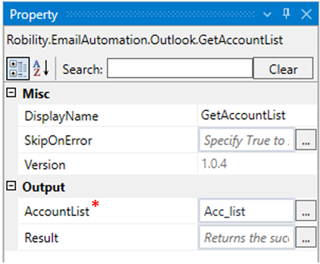
DisplayName: Displays the name of the activity. It can also customize the activity name to helps in troubleshooting. |
|
SkipOnError: It specifies whether to continue executing the workflow even if it throws an error. This supports only Boolean value “True or False”. By default, it is set to “False.” True: Continues the workflow to the next step None: If the option is specified as blank, by default the activity will perform as “False” action. |
||
|
Version: It specifies the version of the Email automation feature in use |
||
|
OUTPUT |
AccountList: It facilitates storing and viewing the activity's output in a "list" format. (Please refer to the steps in creating a workflow for more details.) |
|
|
Result: It helps to view the execution state of the activity. It returns the values in Boolean format. True: It indicates the activity has been executed successfully without any error. False: It indicates that the activity has been faulted due to some unexceptional error thrown. |
* Represents mandatory fields to execute the workflow.
Click here to view an example of how the “GetAccountList” activity is used in the
workflow.